12 Export your CartoDruid project
In this section, you will learn how to export a CartoDruid project in .crtd format. This format is a ZIP-compressed file, which allows it to be shared and imported on other devices.
12.1 Overview
CartoDruid allows you to export a project and share it directly from the device.
All project content is packaged into a .crtd file, which can later be imported on any other device.
The .crtd file contains the following:
- Configuration files for layers, synchronization, users, and custom forms.
- SQLite files containing project data. You can choose which tables retain their data and which are exported empty.
- Images associated with project elements. You can also choose not to include them in the package.
12.2 Project export
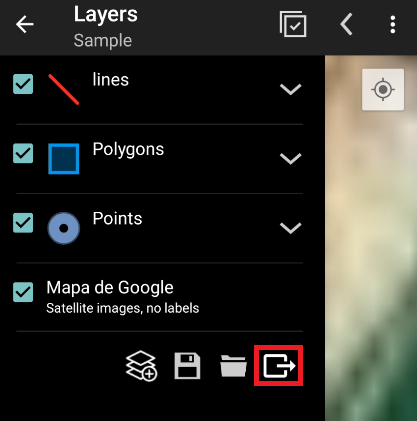
To use the tool, open the TOC and select the button located in the bottom-right corner:
|
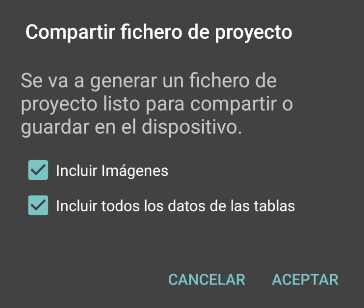
When the button is pressed, the following dialog appears:
|
In this dialog you can choose whether to include images and whether to export all SQLite table data.
|
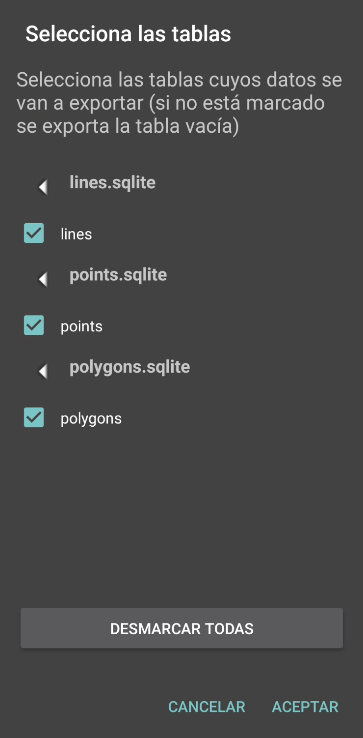
If you uncheck the option “Include all table data”, after pressing ACCEPT a new dialog will appear:
|
In this step you can select which tables will retain their data and which will be exported empty. |
12.3 Export result
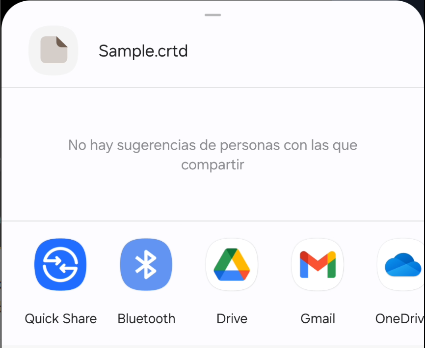
Once the content has been packaged into the .crtd file, the device will display the available sharing options:
|